
AI chat that answers every inquiry instantly.
setup
Common Challenges
Inquiry handling:
are these challenges
holding you back?

 Not enough staff

Knowledge stuck with individuals

Training costs too high

No 24/7 coverage

Slow responses
those limits with AI
Transform inquiry handling with the power of AI chat
AI trained on your own data delivers accurate answers 24/7, 365 days a year. A new answer that lightens the load on staff and raises customer satisfaction.
Features
Three Core Strengths
Anyone can
use it right away
An intuitive interface means no IT knowledge is needed. Tutorial videos and FAQs support first-time users every step of the way.
Learns your data
in a few clicks
No complex setup. Just upload files and the AI instantly learns your company knowledge. You can go live about a month after you start preparing.
Your input is
never used for training
User input and data are never used to train AI, backed by security certified to ISO 27001 and 27017.
Capabilities
Features & Support
Four dedicated features that push inquiry accuracy to the limit
Recommend
As you type,
it finds the best answer
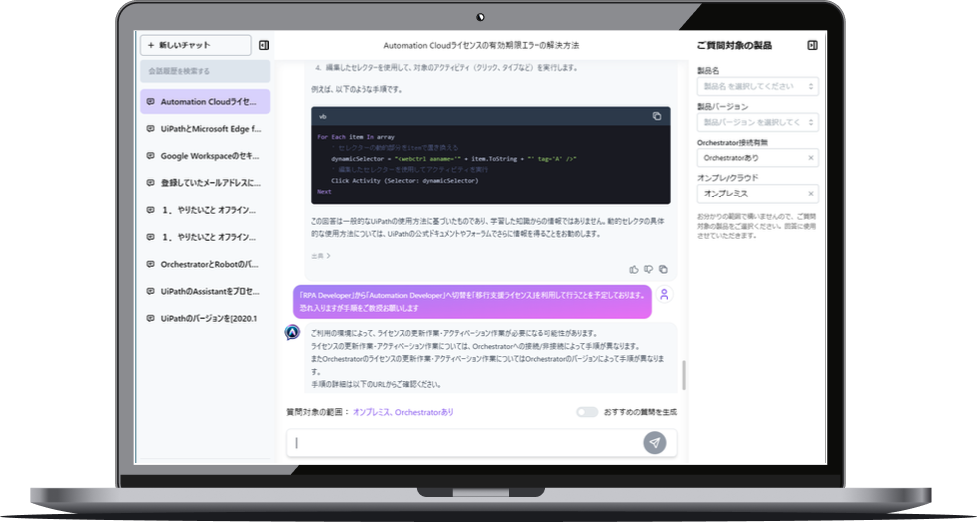
Suggests past inquiries similar to what the user is typing, in real time. Narrow down by product name, version, environment, and more to reach the answer fastest.
- ✓Shows suggestions in real time as you type
- ✓Filter by product, version, and environment
- ✓Keeps learning from past inquiry data
New chat
AI Proofread
AI turns your words
into clear questions
So that even first-time users get precise answers, AI automatically refines and optimizes what users type, greatly improving search accuracy.
- ✓Automatically clarifies vague input
- ✓Anyone can use it, whatever their IT skills
- ✓Shows before-and-after changes in real time
Knowledge Base
Turn knowledge
into team strength
Manage all your knowledge in one easy-to-use admin screen, with full management features that keep even frequently updated data running efficiently.
- ✓Easy data updates with drag and drop
- ✓Organize with categories and tags
- ✓Change history and version control
Chart UI
Just choose
to find the answer
Not comfortable typing? No problem. A chart-style UI of options narrows down the inquiry step by step, so anyone can reach the answer without getting lost.
- ✓Narrow down inquiries with just a tap
- ✓Design branching flows with no code
- ✓Works smoothly on smartphones
Implementation Flow
About a month from first consultation to launch, with a specialist team supporting every step
Preparing Training Data
You provide the FAQ data and website information for the AI to learn. Existing documents and files can be used as they are.
Building AI Advisor 365
We customize the screens, train on your FAQ data, integrate systems, and build an AI environment just for you.
Launch Preparation
We run tests and make final preparations for launch, such as placing banners and setting up links.
Production
Launch and start operating about a month after preparations begin. A dedicated support chat answers your questions quickly once you are up and running.
Live in as little as
1 month
Frequently Asked Questions
AI Advisor 365 offers the following:
1. Ease of use
The interface is intuitive, so anyone can use it without technical knowledge.
2. Easy data import
You can bring your own data into the service in just a few clicks.
3. Privacy protection
User input and data are not used to train AI, so privacy is protected.
Yes. The intuitive screens are easy to use without IT knowledge. AI automatically refines what users type, and a chart-style screen lets people reach answers just by picking options.
User input and data are never used to train AI, and the service is operated under ISO 27001 and 27017 certified security.
During implementation, a specialist team supports every step from discovery to launch. After launch, a dedicated support chat answers your questions quickly.
Yes. We’ll propose the best plan for how you use the service, so feel free to ask.
Trained knowledge is managed in one place on the admin screen, with change history and version control. Please contact us for details on backups.
Ready to
get started?
We’ll create a plan tailored to
your environment and needs.
Feel free to get in touch.