

Challenges and Results
Challenges
- The company's internal Copilot chatbot answered questions using issues and comments stored in Backlog as its knowledge source, but keeping it current depended entirely on staff manually reviewing Backlog, downloading the relevant information, and adding it to the knowledge base
- Because the work was manual, updates were infrequent, and the information the chatbot relied on gradually went stale
- Reliance on manual work also carried the risk of missed updates and human error
Results
- Automated about 99% of the knowledge update process, reducing manual work to nearly zero. Automatic backups also brought the risk of data loss close to zero
- More frequent updates improved the accuracy and reliability of the chatbot's answers, and the system has run stably for several months since launch
Before
Update work so heavy the AI fell behind
The company’s internal Copilot chatbot drew on issues and comments stored in Backlog as its knowledge source. Keeping that knowledge current, however, depended on staff checking Backlog each time, downloading the information they needed, and adding it to the knowledge base by hand.
The burden of this work created a new problem: updates became less and less frequent. The information the chatbot relied on gradually went stale, until it began to undermine the accuracy and reliability of the AI’s answers. Relying on manual work also left room for missed updates and human error.
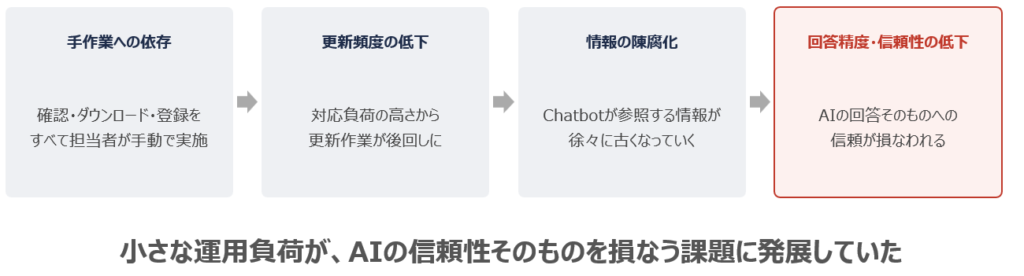
Figure: How information loses its freshness
Redesign
An automated update flow built on Power Platform, Azure Functions, and APIs
The goal of the project was to fully automate the knowledge update process itself. With Microsoft Power Automate at its center, ITSO built a workflow connecting the Backlog API, SharePoint, and Azure Functions. The workflow retrieves Backlog issues and comments automatically, and a child flow converts them into text files and saves them to SharePoint.
ITSO also added a Python script running on Azure Functions that automatically collects PDF and HTML files from the official website twice a month. The files are stored temporarily in Azure Blob Storage, transferred to SharePoint, and finally added to the Copilot chatbot’s knowledge base. A knowledge base that once depended on Backlog alone now also reflects the latest information from the official website automatically, broadening the range of information the chatbot can draw on.
For operations, all sensitive credentials are managed securely in Azure Key Vault, and Slack notifications show processing status in real time. An automatic backup function guards against the loss of update data. With no one stepping in by hand anymore, the system is designed to recover even if a processing error or data inconsistency occurs, giving it a solid foundation for stable operation.
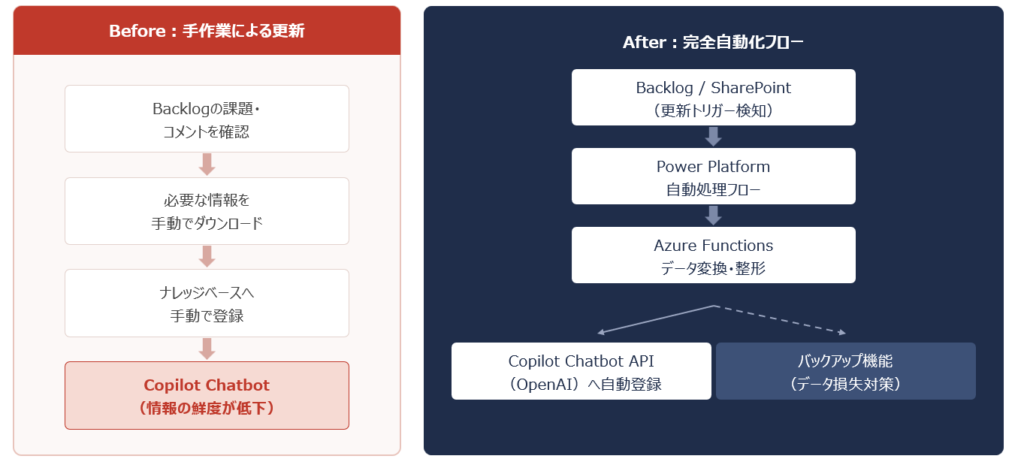
Figure: The update process, before and after
After
Manual work cut to nearly zero, with stable operation ever since
After the system went live, about 99% of the knowledge update process was automated, and manual work time fell to nearly zero. More frequent updates now keep the information behind the Copilot chatbot up to date, improving the accuracy and reliability of its answers. The backup function has brought the risk of data loss close to zero, and the system has continued to run stably for several months since launch.
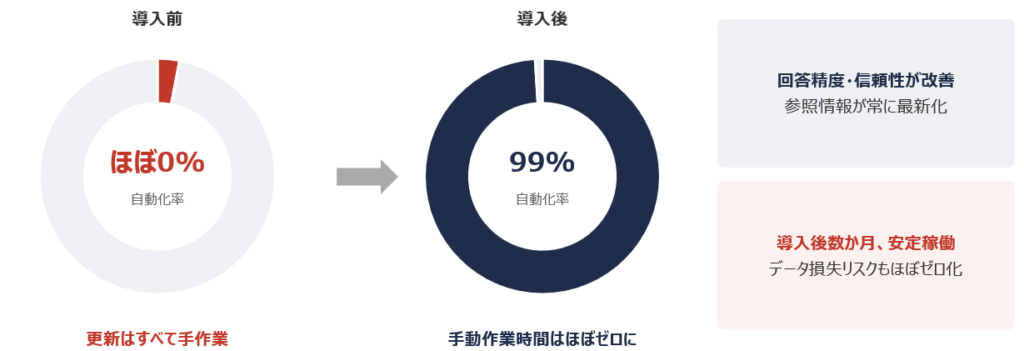
Figure: Results of automation
If your organization is struggling to keep multiple sources such as Backlog and your website up to date by hand, or finds that outdated information is hurting your AI chatbot’s answers, we hope this case offers useful insights.