
Task Mining
Visualize the hands-on work
that system logs never capture.
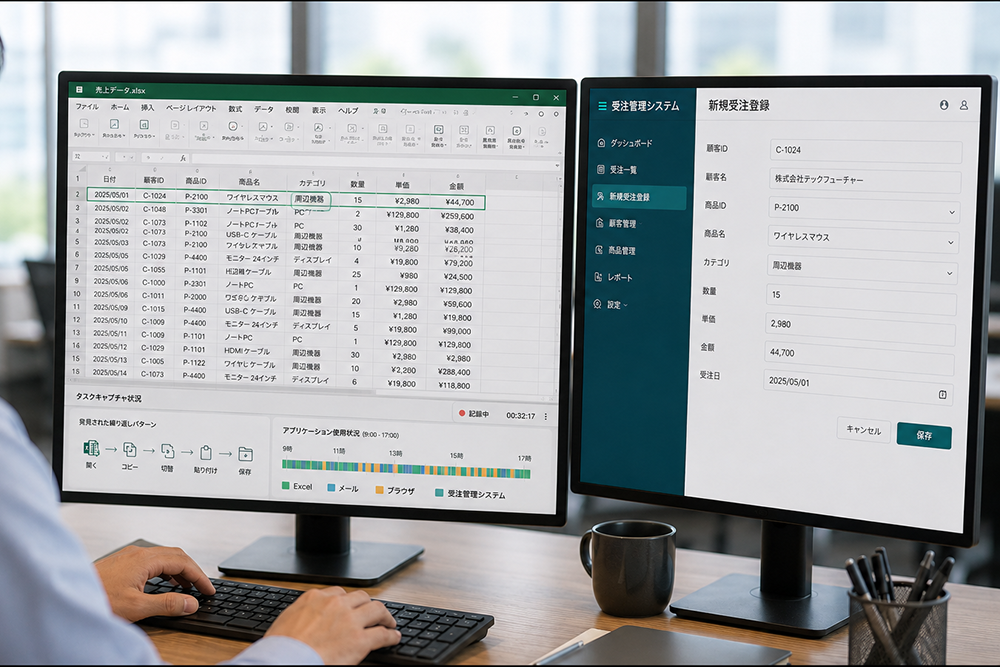
ITSO’s task mining records operation logs on PCs, such as clicks, keystrokes, and app switching, to visualize the hands-on reality of front-line work. It fills in the manual work between systems that process mining cannot see, and supports data-driven identification of what to automate with RPA.
See the work.
Not just the system.
Look at people’s hands,
not just systems.
Visualize hands-on work
with data.
Task mining is a technology that records operation logs on PCs, such as clicks, keystrokes, and app switching, to visualize how work is actually done at the level of individual tasks. It reveals the reality of manual work that system logs alone cannot show.
Three Data Capture Types
How operations are recordedScreen capture
Takes screenshots at regular intervals and infers operations through image analysis.
OS event logs
Records keyboard and mouse operations and window switching as events.
Browser activity logs
Records operations in web apps through a browser extension.
We select the best product, such as UiPath Task Mining, Power Automate Task Mining, or Automation Anywhere Process Discovery, based on the recording method, RPA integration, and fit with your existing environment.
How It Runs
Always recording by default; people act only when personal data is detectedTask mining basically keeps recording operation logs on target PCs. Personally identifiable information such as passwords is masked automatically, and a person checks only when something may have been missed.
What Task Mining Can Do
Automatic operation logs
Automatically records clicks, keystrokes, and app switching without getting in the way.
These are the main functions shared by UiPath and Automation 360. Combined with process mining, they let you understand your operations from both the system’s and people’s perspectives.
Transform your business processes
with task mining.
Don’t let task mining stop at a one-time survey. Building a culture of continuous automation and standardization based on the hands-on reality you discover makes the impact far greater. From product selection and analysis to carrying out and embedding improvements, ITSO stays by your side throughout.
Overview of Support Services
defining what to record
consent-building training
01Evaluation
Foundation
- Agent distribution & licenses
- Privacy policy & data anonymization
Transformation
- Inventory of target teams & work and defining what to record
- ROI calculation & product/approach selectionGuesswork in choosing RPA targets / Better automation accuracy
- Employee briefings & consent-building trainingVisualizing individual-dependent work / Respecting privacy
- Anonymization & governance frameworkStronger compliance / Easing surveillance concerns
02Preparation
Execution
- Selecting target teams & PoC trial
- Full rollout (agent deployment & analysis)
03Operation & Scale
Execution
- Adding target teams & rolling out
- Scaling success stories
Cross-functional / All phases
- Continuous data collection & analysis support
- Privacy operations & automation execution support (ongoing support)
Solution
Centered on three platforms, UiPath, Power Automate, and Automation Anywhere, ITSO’s task mining solutions help you select, implement, and make full use of the best product for your IT environment and analysis goals.
-
UiPath Task Mining
Combines OS event logs and screen captures to analyze operations in detail for individuals and teams, and passes automation candidates seamlessly to UiPath Studio.
Learn more -
Power Automate Task Mining
Records operations with OS event logs based on the UI Automation API. Strong at analyzing Microsoft 365 apps, it connects directly to building Power Automate Desktop flows.
Learn more -
Automation Anywhere Process Discovery
Centered on screen capture and computer vision analysis. Because it does not depend on the OS, it can capture how work is done even in legacy environments and virtual desktops.
Learn more


Tech
Column
Practical insights and tips on task mining. Articles are available in Japanese only.