
Process Mining
Not by intuition or experience,
but by uncovering the truth of your work from log data.
ITSO’s process mining analyzes the event logs stored in your business systems and objectively visualizes the gap between how your processes should run and how they actually run. We identify bottlenecks, deviations, and inefficiencies, and drive data-driven improvement in combination with RPA and BPA.
See the
process,
not the guesswork.
See the process,
not assumptions.
Visualize how work really happens,
from log data.
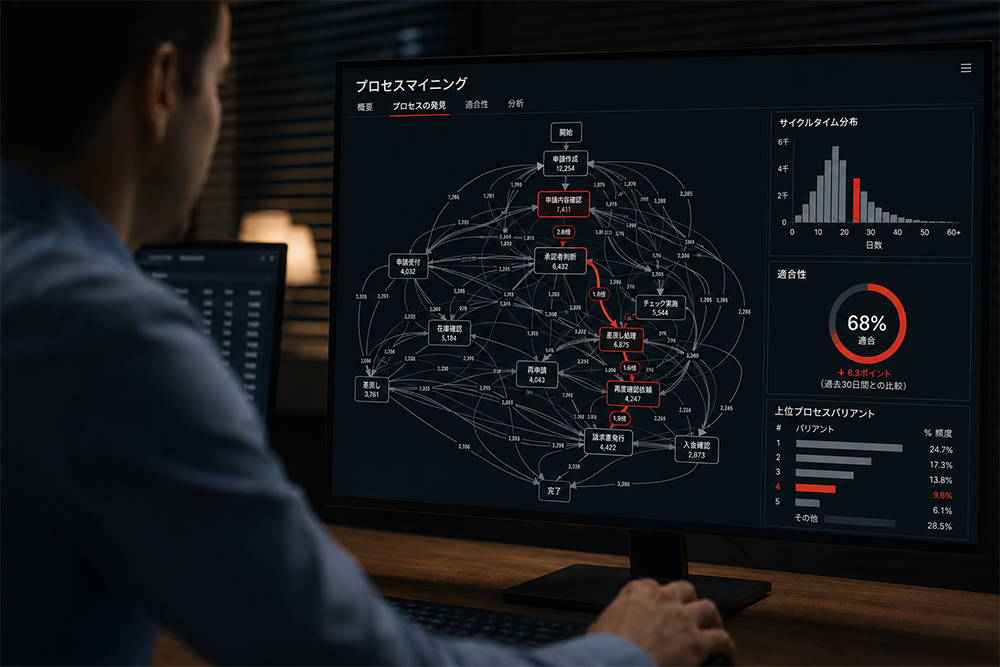
Process mining is a technology that analyzes the event logs left in your systems and automatically visualizes how your business processes actually flow. You can identify improvements based on data rather than intuition or experience.
Two Deployment Types
Choose by analysis scope and RPA integrationEnterprise-wide (Celonis, etc.)
Supports logs from a wide range of systems, including ERP, SaaS, and databases. Well suited to company-wide analysis across multiple departments and systems.
RPA-integrated (UiPath Process Mining)
Integrates seamlessly with UiPath robot execution logs. If you already have a UiPath environment, individual teams can start right away.
Both can integrate with major RPA products such as UiPath, and you can choose according to your company’s scale and system landscape. They can also be used together.
How It Runs
Continuous analysis by default; people act only when a bottleneck is foundProcess mining becomes more accurate as logs accumulate. Analysis basically keeps running unattended, and staff step in to improve only the steps where bottlenecks or deviations are detected.
What Process Mining Can Do
Automatic process maps
Automatically maps the actual processing paths from time-series log data. Even complex paths that people cannot grasp by eye can be visualized using complete data.
These are the main functions shared by Celonis and UiPath Process Mining. A good approach is to start with a single process and expand the scope while confirming the results.
Transform your business processes
with process mining.
Don’t let process mining stop at reporting on the current state. Using what you discover as an opportunity to rethink your entire business process makes the impact far greater. From product selection and analysis to carrying out and embedding improvements, ITSO stays by your side throughout.
Overview of Support Services
defining the scope
operator development
analysis models & dashboards
01Evaluation
Foundation
- Log collection connection design
- Tool selection & license procurement
Transformation
- Inventory of target processes & defining the scope
- ROI calculation & product/approach selectionLabor shortages / Competitiveness
- Analysis training for teams & operator developmentStandardization / Less reliance on individuals
- Building a team for analysis models & dashboardsProductivity / A data-driven culture
02Preparation
Execution
- Visualizing target processes & identifying issues
- Implementation support (PoC & trial)
03Operation & Scale
Execution
- Adoption (full rollout & KPI operation)
- Scaling success stories
Cross-functional / All phases
- Dashboard operation & continuous monitoring
- Model retraining & expanding the scope (ongoing support)
Solution
Centered on Celonis, UiPath Process Mining, and Power Automate Process Mining, ITSO’s process mining solutions help you select, implement, and make full use of the best platform for your environment and analysis goals.
-
Celonis
The leader of the process mining market. With built-in connectors for major systems such as ERP, CRM, and SCM, it can analyze and improve large-scale business processes in real time.
Learn more -
UiPath Process Mining
A process mining tool seamlessly integrated with the UiPath RPA platform. Because it covers everything from analysis to implementing automation, it maximizes the impact of RPA.
Learn more -
Power Automate Process Mining
If you already use Microsoft 365 and Power Platform, you can start process mining at low additional cost, and feed the analysis results straight into Power Automate flow development.
Learn more

Tech
Column
Practical insights and tips on process mining. Articles are available in Japanese only.