
RPA
Knowing your business processes inside out,
we design and implement the right automation.
ITSO uses RPA not merely as a tool that replaces manual tasks, but as the starting point for hyperautomation. We analyze your workflows in depth, identify where automation should be applied, and connect it with AI, process mining, and LCAP to optimize your operations as a whole.
Automate
the routine.
Free the people.
Automate the routine.
Leave people the work only people can do.
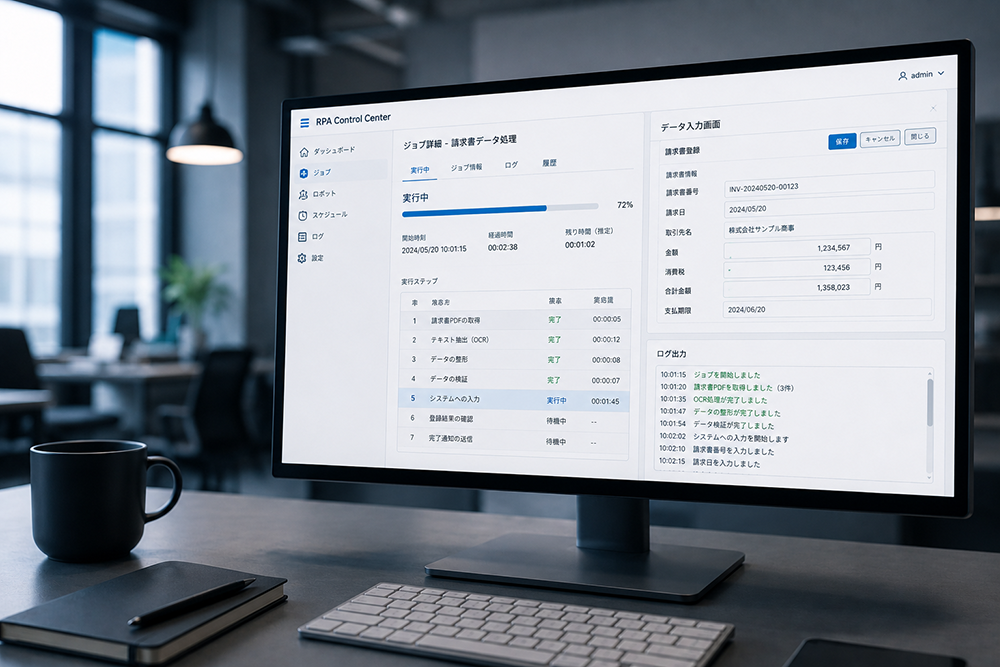
Operate your existing systems’ screens
just as they are.
RPA looks at the screen and operates it just as a person would. That means no system modifications or API development are needed. It fits smoothly into legacy systems that have been in use for years.
Two Deployment Types
Choose by where it runsDesktop & Server
The desktop type runs quietly on your own PC, while the server type runs robots together on an in-house server. From individual use to company-wide rollout, you can choose according to scale.
Cloud
It runs entirely in the browser, so you can start right away with nothing to install. It excels at connecting SaaS and cloud services.
Many major products can be freely combined to suit the scale of your operations. Both types can be introduced without modifying existing systems.
How It Runs
Unattended by default; people step in only when neededRPA basically keeps running overnight or at set times without human help. Staff step in only when something unexpected happens, and once it is resolved, the robots return to unattended operation. Some work, such as handling inquiries, is better suited to running alongside people, so we choose the right approach for each task.
What RPA Can Do
Screen operation automation
Robots learn and reproduce exactly what people do with a mouse and keyboard. There is no need to modify existing systems.
All of these can be built with low-code or no-code tools, so you can automate work without programming knowledge. You can also expect a return on investment in a relatively short time.
Transform your business processes
with RPA.
Don’t let RPA stop at automating a few tasks. Using it as an opportunity to rethink your entire business process makes the impact far greater. From strategy and development to making it stick, ITSO stays by your side throughout.
Overview of Support Services
01Evaluation
Foundation
- Server environment setup
- License selection & procurement
Transformation
- Business research & selecting what to automate
- ROI calculation & product/approach selectionLabor shortages / Competitiveness
- On-site training & operator developmentWorkstyle reform / Reducing long hours
- Building a scenario & robot development teamProductivity / Quality
02Preparation
Execution
- Finding target tasks & identifying issues
- Implementation support (PoC & trial)
03Operation & Scale
Execution
- Adoption (full rollout)
- Scaling success stories
Cross-functional / All phases
- Operation monitoring & regular maintenance
- Rogue robot control & RPA subscription (ongoing support)
Solution
Backed by deep knowledge of the major tools and hands-on implementation experience, ITSO’s RPA solutions support you from choosing the best platform through implementation and operation.
-
UiPath
The world’s No. 1 RPA platform by market share. An enterprise solution with advanced AI integration, large-scale robot management, and robust security.
Learn more -
Power Automate
An RPA tool deeply integrated with Microsoft 365. It manages both cloud and desktop flows in one place and enables seamless automation with Teams, SharePoint, and Excel.
Learn more -
Automation Anywhere
A cloud-native RPA platform. With intelligent document processing and AI capabilities built in, it can automate even complex business processes.
Learn more -
Blue Prism
A UK-born platform known as a pioneer of RPA. With strict permission and audit controls and an object-oriented, component-based design, it has an extensive track record in industries that demand strong internal controls, such as finance and insurance.
Learn more -
WinActor
A Japanese RPA tool that originated in the NTT Group. With flowchart-style scenario building and extensive Japanese-language support, even people with no programming experience can master it quickly.
Learn more -
BizRobo!
A platform that pioneered the RPA market in Japan early on. It features a small start from a single machine, with licensing and management functions that scale smoothly from there.
Learn more



Tech
Column
FDE(Forward Deployed Engineer)とは?
SE・ITエンジニアとの違い、必要なスキルを解説
【Power Automate】Outlookの未返信メールを検知・返信リマインドをする方法
業務をゼロベースで見直すBPRとは?
失敗しない進め方と成功の秘訣【業務改革の第一歩】
【Power Automate】Slack投稿をトリガーにしてフローを実行する方法
【Power Automate】日付を条件としたフィルタークエリでSharePointリストからアイテムを抽出する方法
Practical insights and tips on RPA. Articles are available in Japanese only.